

Every network I’ve ever assessed had at least one surprise in it — a forgotten remote-access path, a switch running default credentials, a “temporary” firewall rule from 2021. Not because the teams were careless, but because networks grow the way cities do: one reasonable decision at a time, until nobody holds the full map anymore. A network security assessment is how you get the map back — and find the gaps before someone else does.
This guide covers what a network security assessment actually is (and how it differs from a penetration test), what it examines, the seven steps to run one, and the findings that show up in almost every report.
What Is a Network Security Assessment?
A network security assessment is a systematic evaluation of an organization’s network infrastructure — its architecture, devices, configurations, access controls, and monitoring — to identify vulnerabilities, misconfigurations, and design weaknesses before attackers can exploit them.
The word people trip on is “assessment,” because three related exercises get blended together:
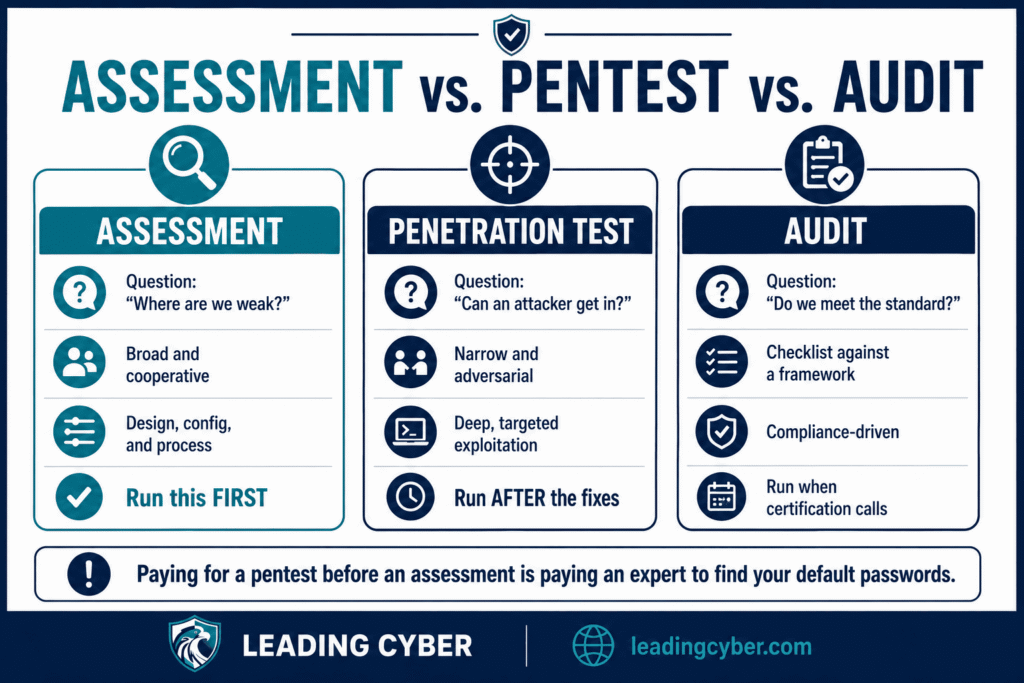
- Assessment — a broad, cooperative review: where are we weak? Covers design, configuration, and process, not just technical flaws.
- Penetration test — an adversarial exercise: can a skilled attacker actually get in? Narrower, deeper, and usually run after assessments have cleaned up the obvious.
- Audit — a compliance check: do we meet a defined standard? Measures you against a checklist, not against an attacker.
Order matters here. Paying for a penetration test before you’ve done an assessment is paying an expert to tell you what a scan would have — I’ve watched organizations spend pentest money to learn they had default passwords. Assess first, fix, then test.
When to Run a Network Security Assessment
Four reliable triggers: annually as a baseline; after major changes — a cloud migration, an office move, a merger (inherited networks are surprise machines); before compliance pushes, since an assessment finds what the auditor will; and after incidents, when you finally have organizational appetite to fix the things the assessment will surface. If you can’t remember the last one, that’s the fifth trigger.
What a Network Security Assessment Examines
- Architecture and segmentation — is the network divided into zones that contain a breach, or is it one flat plain where an attacker who lands anywhere can walk everywhere?
- Network security devices — firewalls, switches, routers, VPN concentrators: firmware currency, configuration quality, and whether anyone changed the default credentials (you’d be amazed)
- Firewall rules — the archaeology layer: rules nobody remembers, “temporary” openings that became permanent, any-any rules hiding in the middle
- Access controls — who can reach what, whether least privilege is real or aspirational, and how remote access is secured (MFA on the VPN is table stakes now)
- Wireless — guest network isolation, protocol strength, and rogue access points someone plugged in “just for the conference room”
- Network security monitoring — the question most assessments answer badly: if an attacker were inside right now, would anything notice? Logging that exists but is never read counts as no
- Patching posture — network gear is the most forgotten equipment in most patch programs, and attackers know it

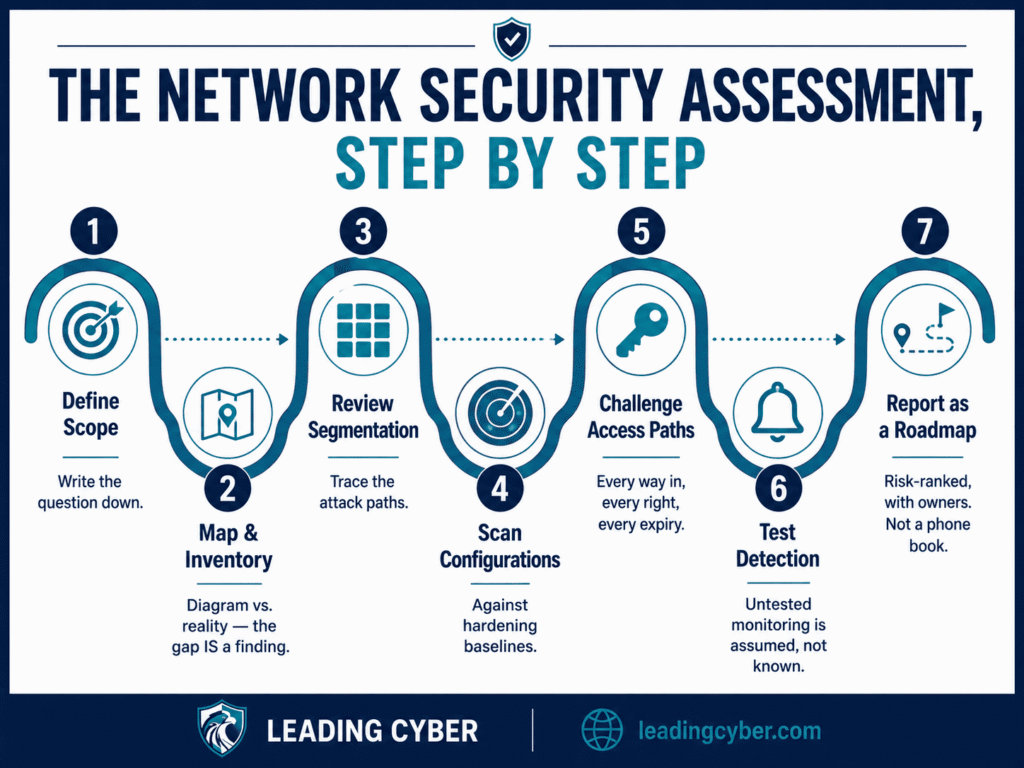
How to Conduct a Network Security Assessment: 7 Steps
Step 1: Define Scope and Objectives
Which networks, sites, and cloud environments are in — and what question you’re answering. “Are we segmented enough to survive ransomware?” produces a different assessment than “are we ready for the SOC 2 audit?” Write the objective down; it disciplines everything after.
Step 2: Map the Network and Inventory Assets
Discovery scans plus documentation review, reconciled against reality. The gap between the network diagram and the actual network is a finding — often the most important one. Every assessment I’ve been part of found devices nobody could explain.
Step 3: Review Architecture and Segmentation
Trace the paths: from a compromised laptop, what can be reached? From the guest Wi-Fi? From a vendor’s VPN account? Flat networks turn one phished user into a company-wide event; segmentation turns the same click into a contained annoyance.
Step 4: Scan Devices and Configurations
Vulnerability scans across network gear and the systems behind it, plus configuration review against hardening baselines (CIS benchmarks are the common yardstick). This step plugs directly into your vulnerability management lifecycle — the assessment feeds the loop, not a shelf.
Step 5: Review Access Controls and Remote Paths
Every way into the network gets listed and challenged: VPNs, exposed services, vendor connections, that RDP port someone opened during the pandemic. Then the internal question: do access rights match roles, and do they expire?
Step 6: Test Your Ability to Notice
The step everyone skips. Generate benign test events and see whether monitoring catches them — a login from an odd location, a port scan, traffic to a known-bad address. Detection you’ve never tested is like the backup you’ve never restored: assumed, not known.
Step 7: Report With a Prioritized Roadmap
The deliverable isn’t a 200-page PDF of findings — it’s a ranked fix-list with owners and timelines, ordered by actual risk rather than raw severity. The risk-based prioritization approach applies here exactly: an exposed, exploited medium beats an isolated critical, every time.
DIY or Third Party?
Both, at different rhythms. Internal teams can and should run the recurring version — quarterly scans, rule reviews, access recertification — as part of routine network security management. But bring in outside eyes every year or two, for two honest reasons: external assessors carry no assumptions (“that’s always been like that” is invisible from inside), and their findings carry political weight internal reports sometimes can’t. A third-party report saying “the flat network is your top risk” unlocks budget that the same sentence from your own team didn’t.
What Assessments Almost Always Find
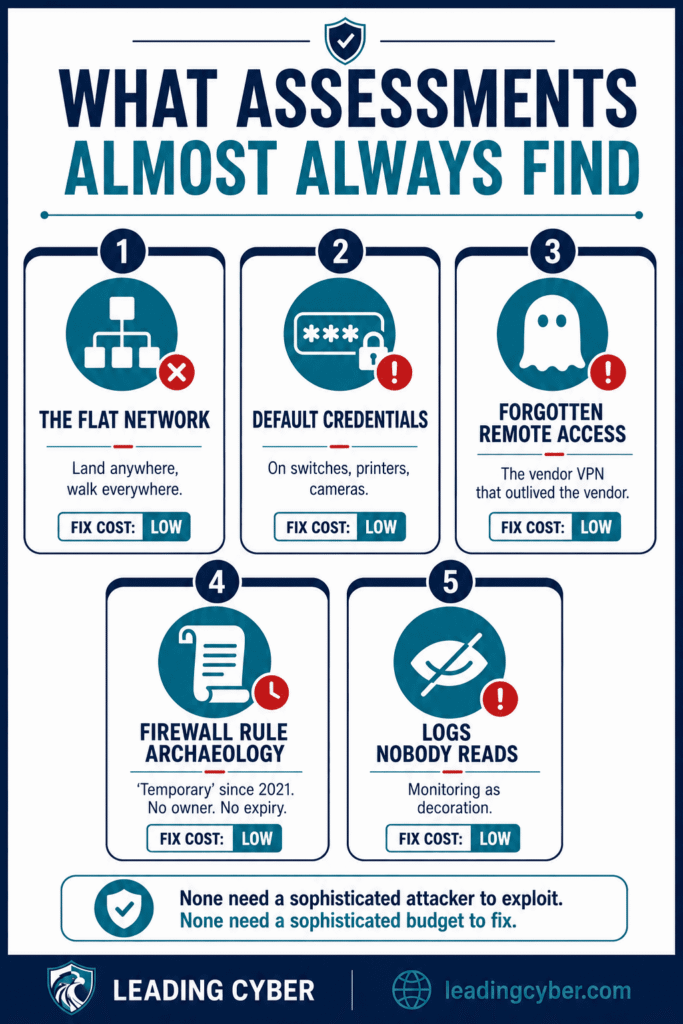
After enough of these, the greatest-hits list writes itself:
- The flat network — little or no segmentation between user machines, servers, and critical systems
- Default or shared credentials on switches, printers, cameras, and other network security devices
- Forgotten remote access — a vendor VPN from a finished project, still live
- Firewall rule archaeology — permissive rules with no owner and no expiry
- Logs nobody reads — monitoring as decoration rather than detection
Notice what these have in common: none require sophisticated attackers to exploit, and none require sophisticated budgets to fix. Which is exactly why an assessment — before the incident — is one of the highest-return exercises in security, and pairs naturally with the broader work of preparing for a cyber attack.
Key Takeaways
- A network security assessment is a broad, cooperative review of architecture, devices, access, and monitoring — run it before paying for a penetration test
- Annual cadence, plus after major changes, before compliance pushes, and after incidents
- The seven steps: scope, map, review segmentation, scan configurations, challenge access paths, test detection, and report as a risk-ranked roadmap
- Test whether monitoring actually notices — detection you’ve never tested is assumed, not known
- The most common findings (flat networks, default credentials, forgotten access) are cheap to fix and expensive to ignore
Frequently Asked Questions
What is a network security assessment?
A network security assessment is a systematic evaluation of your network infrastructure — architecture, segmentation, device configurations, firewall rules, access controls, wireless, and monitoring capability — to identify vulnerabilities and design weaknesses before attackers exploit them. It’s a broad, cooperative review, distinct from the narrower adversarial testing of a penetration test.
What is the difference between a network security assessment and a penetration test?
An assessment asks “where are we weak?” — a wide, cooperative review of design, configuration, and process. A penetration test asks “can a skilled attacker actually get in?” — a narrow, adversarial exercise against specific targets. Run the assessment first: paying for a pentest before fixing the obvious gaps means paying an expert to report what a scan would have found.
How often should you do a network security assessment?
Annually as a baseline, plus after major changes — cloud migrations, office moves, mergers — before compliance certifications, and after security incidents. Internal teams should run lighter recurring versions (quarterly scans, firewall rule reviews, access recertification) between the full assessments, with third-party eyes brought in every year or two.
What does a network security assessment include?
Seven core areas: network architecture and segmentation, the configuration and firmware of network security devices (firewalls, switches, routers), firewall rule review, access controls and remote access paths, wireless security, monitoring and detection capability, and patching posture. The deliverable should be a risk-ranked remediation roadmap with owners — not just a catalog of findings.
How much does a network security assessment cost?
Third-party assessments commonly run from a few thousand dollars for a small, single-site network to tens of thousands for complex, multi-site or hybrid-cloud environments — scope is the main cost driver. Internal recurring assessments cost mostly staff time plus scanning tools. Either way, compare the price against the common findings it surfaces: the gaps assessments find are the ones incidents exploit.
Can you do a network security assessment yourself?
Yes — internal teams can run the recurring core: discovery scans, vulnerability scanning, firewall rule reviews, and access recertification. The limits are assumptions and politics: insiders stop seeing what’s “always been like that,” and internal findings sometimes lack the weight to unlock budget. The practical pattern is DIY on a routine cadence, with an external assessment every year or two.