
Ransomware is the incident every leader quietly dreads, and most of the dread comes from not understanding the mechanics. So let’s fix that. How does ransomware spread, how do you catch it before the encryption starts, and — the question nobody wants to answer in the moment — should you ever pay?
I’ll take those in order, and I’ll be honest where the honest answer is uncomfortable. Because ransomware defense isn’t really about the malware; it’s about a handful of doors you either closed in advance or didn’t, and a handful of decisions you either made in advance or didn’t.
What Ransomware Actually Is Now
The classic definition — malware that encrypts your files and demands payment for the key — is a few years out of date. Modern ransomware operations run double extortion: before encrypting anything, they quietly steal your data, so even a perfect backup restore leaves the second threat standing — “pay, or we publish.” Many groups operate as ransomware-as-a-service, with developers, affiliates, and negotiation departments. It’s organized crime with a help desk.
That evolution matters for defense: backups solve the encryption problem, but only prevention and early detection solve the theft problem.
How Does Ransomware Spread?
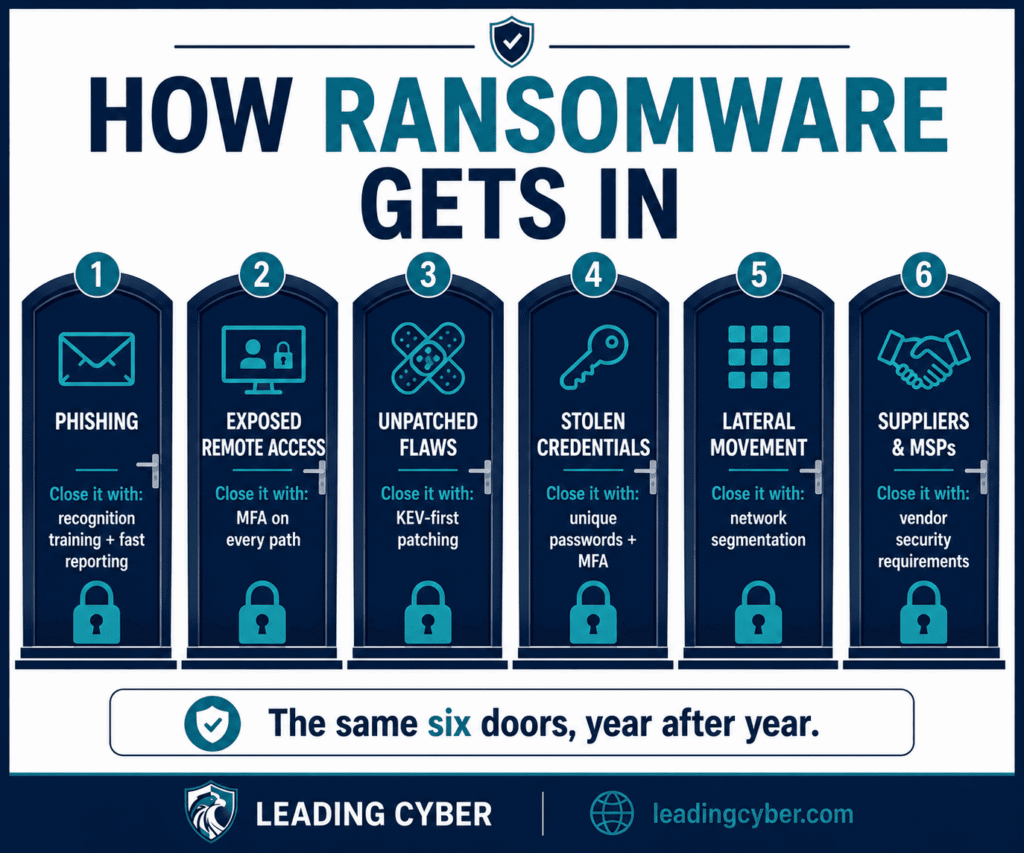
Despite the headlines, ransomware doesn’t materialize out of nowhere. It arrives through a short, stable list of doors — the same ones, year after year:
1. Phishing
Still the front door. A malicious attachment or a credential-stealing link gives attackers their first foothold — which is why employee recognition and fast reporting after someone clicks a phishing link matter more to ransomware defense than any single appliance.
2. Exposed Remote Access
Internet-facing RDP and VPNs with weak or reused credentials are bought and sold in bulk on criminal markets. Attackers don’t hack in; they log in. MFA on every remote path closes most of this door outright.
3. Unpatched Vulnerabilities
Known flaws in VPN appliances, file-transfer tools, and public-facing servers get mass-exploited within days of disclosure. This is the door your vulnerability management lifecycle exists to keep shut — and why KEV-listed findings jump the queue.
4. Compromised Credentials
Passwords leaked in unrelated breaches, reused on your systems. No malware needed at this stage at all — just a login screen and a list.
5. Lateral Movement Inside
Here’s the part that decides the blast radius. Once inside, operators spend days or weeks moving quietly — harvesting admin credentials, mapping the network, locating the backups. On a flat network, one foothold becomes everything; with real segmentation, the same foothold hits a wall. This is exactly what a network security assessment measures when it traces attack paths.
6. Suppliers and Service Providers
The indirect route: a compromised managed service provider or software update delivers access to every downstream customer at once. You inherit your vendors’ security whether you audited it or not.
How to Detect Ransomware Before the Encryption
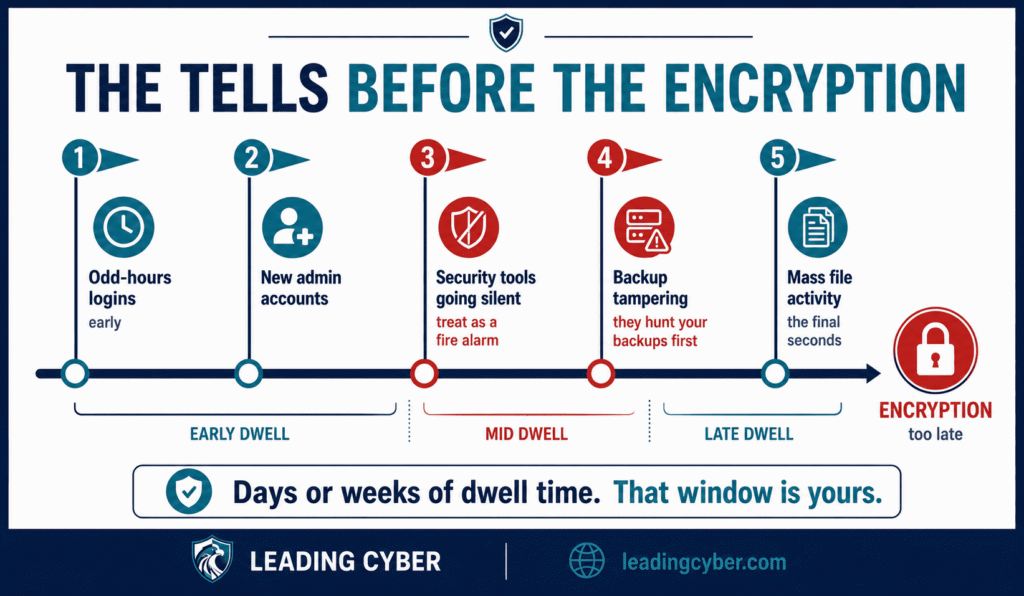
The encryption is the finale, not the attack. There’s usually a dwell period — days, sometimes weeks — where the operators are inside preparing. That window is your detection opportunity, and it has recognizable tells:
- Odd account behavior — logins at strange hours, from strange places, or service accounts suddenly browsing the network
- Privilege escalation and new admin accounts nobody remembers creating
- Security tools being disabled — attackers switch off antivirus and EDR before the main event; treat any unexplained agent going silent as a fire alarm
- Backup tampering — deletion of shadow copies, changes to backup jobs, logins to the backup console. They hunt your backups first, precisely because backups are your leverage
- Mass file activity — thousands of files being read, renamed, or rewritten in minutes; by this point you’re in the final seconds, which is why the earlier tells matter more
- Unusual outbound transfers — the double-extortion theft happening before your eyes, if anyone’s watching the egress
Practically: endpoint detection (EDR) on every machine, alerts on backup-console access and mass file operations, and — the cheap trick I like — canary files: decoy documents nobody should ever touch, wired to alarm when something does.
The First Hour: What to Do When It Hits
Short version, because the long version is your incident response plan (and if you don’t have one, start here): isolate affected systems from the network immediately — pull cables, disable Wi-Fi, but don’t power machines off, since memory can hold forensic evidence and, occasionally, encryption keys. Protect the backups — disconnect or lock the backup infrastructure before the attackers finish the job. Escalate to your commander, insurer, and IR firm. Preserve logs and one affected machine for forensics. And say it early and internally: honest reporting, no blame — the employee who clicked is your best witness, not your scapegoat.
Should You Pay the Ransom?
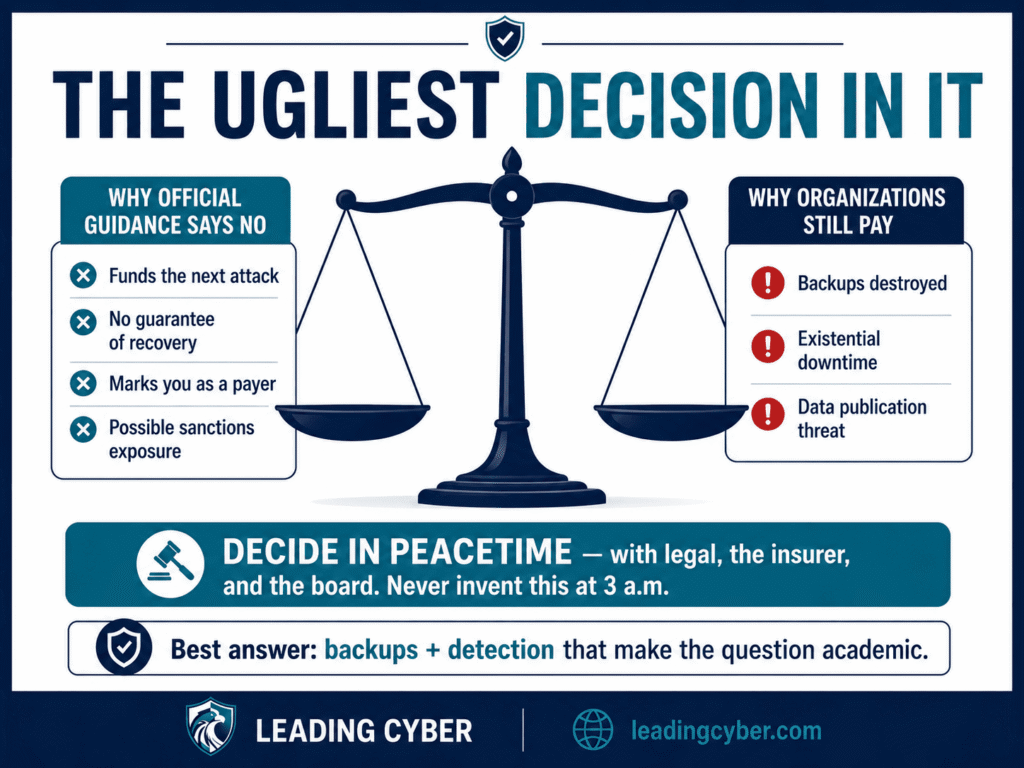
Now the ugly one. The official guidance — FBI, CISA, most governments — is don’t pay, and the reasons are solid:
- Payment funds the industry that will attack the next organization, and marks you as a payer worth revisiting
- There’s no guarantee — decryptors are often slow and buggy, some data never comes back, and “we deleted your files” from an extortion crew is worth exactly what you’d expect
- It can be illegal — paying a sanctioned entity creates real regulatory exposure (in the US, OFAC has said as much), which is why counsel is involved before any payment discussion
And yet organizations pay, regularly — because the honest calculus at 3 a.m. sometimes reads: backups gone, hospital systems down, payroll in four days. I won’t pretend that dilemma away; anyone who tells you the answer is always simple has never been in the room.
Which is exactly the point I made in the preparation guide: this decision should never be invented during the incident. Decide your position in peacetime — with legal, the insurer, and the board — including who has authority to change it under fire. And notice the deeper truth: every hour spent on backups, segmentation, and detection is an hour spent making this question irrelevant. The best answer to “should we pay?” is to have made the question academic.
How to Get Rid of Ransomware
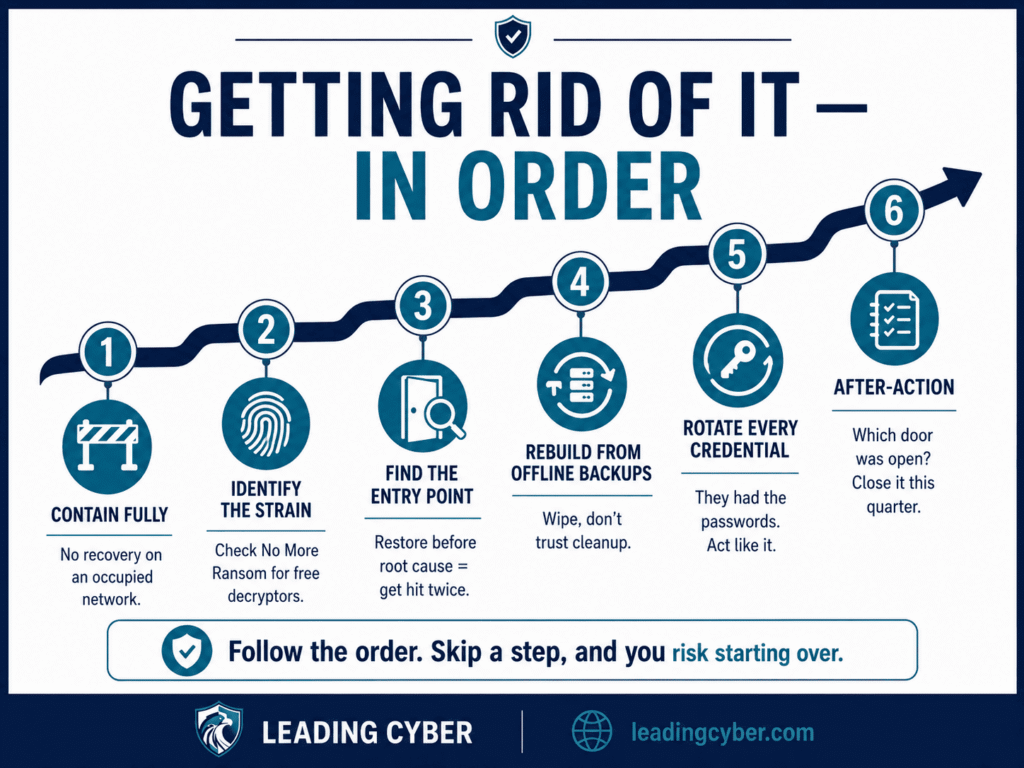
Recovery, in order:
- Contain fully first — no recovery on a network the attackers still occupy
- Identify the strain — the ransom note and file extensions usually identify the family; check the No More Ransom project, a free law-enforcement/industry initiative that hosts working decryptors for some strains. Worth ten minutes before any harder choices
- Find the entry point — restore before root cause and you’ll restore the vulnerability too; plenty of victims get hit twice this way
- Rebuild from known-good, offline backups — wipe and rebuild affected systems rather than trusting cleanup; assume anything the attackers touched is theirs
- Rotate every credential — they had the passwords; act like it
- Then the after-action — which door was open, and which of the six spread vectors above gets closed this quarter
Key Takeaways
- Ransomware spreads through six stable doors: phishing, exposed remote access, unpatched flaws, stolen credentials, lateral movement, and suppliers
- Modern operations steal before they encrypt — backups beat the encryption, only prevention and detection beat the theft
- The dwell period is your window: disabled security tools, backup tampering, and odd logins are the tells
- Decide the payment question in peacetime, with legal and the insurer — never invent it at 3 a.m.
- Recover in order: contain, identify, root-cause, rebuild from offline backups, rotate everything
Frequently Asked Questions
How does ransomware spread?
Through six main routes: phishing emails carrying malicious attachments or credential-stealing links, exposed remote access like RDP and VPNs without MFA, unpatched vulnerabilities in internet-facing systems, credentials stolen or leaked in other breaches, lateral movement across flat internal networks once attackers gain a foothold, and compromised suppliers or managed service providers whose access reaches every customer.
What are the first signs of ransomware?
Before encryption starts, watch for: logins at odd hours or from odd locations, new administrator accounts nobody created, security tools like antivirus or EDR being disabled, tampering with backups or shadow copies, unusual outbound data transfers, and mass file read/rename activity. Attackers typically dwell for days or weeks preparing — those tells are your window to stop the finale.
Should you pay a ransomware ransom?
Official guidance from the FBI and CISA is no: payment funds future attacks, provides no guarantee of recovery, and can create legal exposure if the recipient is sanctioned. In practice, some organizations facing destroyed backups and existential downtime still pay, usually via insurers, negotiators, and counsel. The real answer: decide your position in advance with legal and the board — and invest in backups and detection so the question stays academic.
Can you remove ransomware without paying?
Often, yes. Contain the infection, identify the strain from the ransom note and file extensions, and check the No More Ransom project for a free decryptor — some strains have them. Otherwise, recovery means finding the entry point, wiping and rebuilding affected systems, restoring from clean offline backups, and rotating every credential. What you can’t undo without leverage is data theft — which is why detection before exfiltration matters.
Can ransomware spread through a network or Wi-Fi?
Yes — spreading across the internal network is the core of the playbook. Once one machine is compromised, operators harvest credentials and move laterally to servers, domain controllers, and backup systems, whether the connection is wired or wireless. That’s why network segmentation matters so much: on a flat network one foothold reaches everything, while segmented zones contain the blast radius.
What is double extortion ransomware?
Double extortion means attackers steal your data before encrypting it, giving them two levers: pay for the decryption key, and pay again to prevent publication of the stolen files. It’s now standard practice for major ransomware groups — and it changes the defense math, because perfect backups neutralize the encryption threat but do nothing about the theft. Only prevention and early detection address both.