
Ask almost any organization if they have logging turned on, and the answer is yes. Ask if anyone actually looks at it, and the room gets quiet. That gap — logs existing versus logs being watched — is the single most common finding across every network security assessment I’ve been part of. Network security monitoring is the discipline of closing that gap: turning the data your network already generates into something a human, or a system, actually notices.
This guide covers what network security monitoring actually means, what’s worth watching, the toolkit involved, how to build a program that doesn’t drown your team in noise, and the metrics that tell you whether it’s working.
What Is Network Security Monitoring?
Network security monitoring is the continuous collection and analysis of network activity — traffic, logs, and events — to detect signs of compromise, misuse, or policy violations as they happen, rather than discovering them weeks later in an audit.
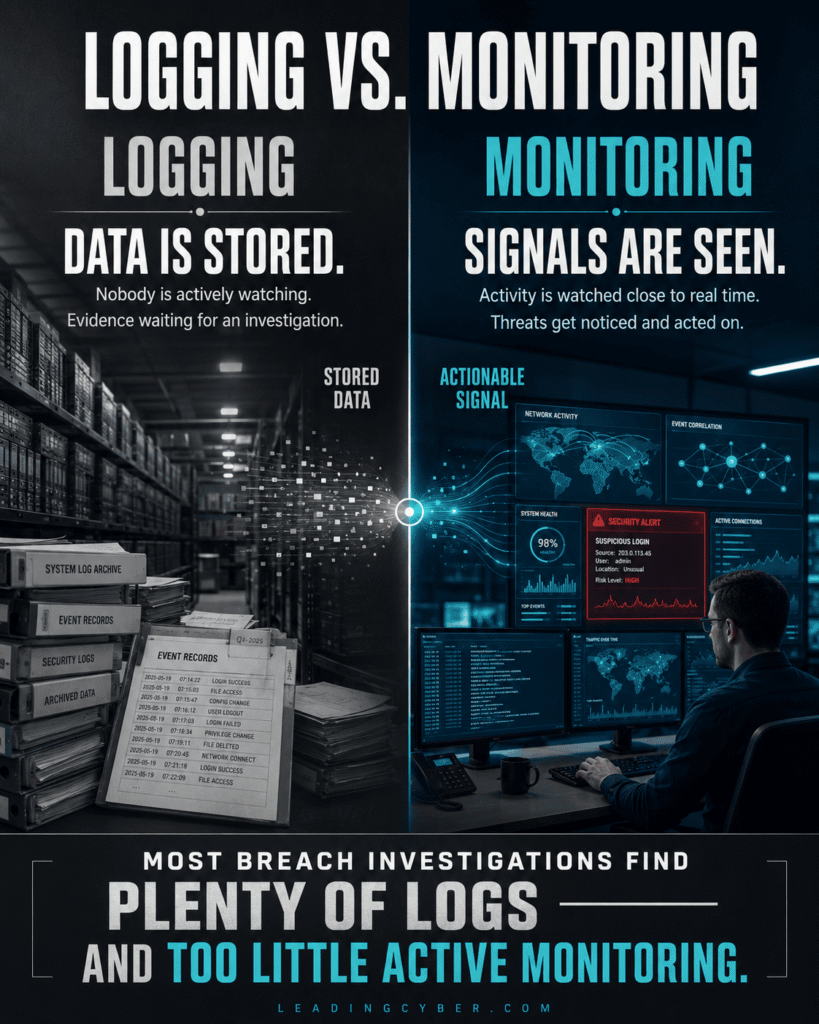
The word doing the heavy lifting there is “continuous.” Logging isn’t monitoring. A server that writes ten thousand log lines a day and nobody reads is, functionally, not being monitored at all — it’s just accumulating evidence for an investigation that hasn’t happened yet. Monitoring means someone, or something, is watching in something close to real time.
What Actually Needs Watching
A full monitoring program touches several layers, and skipping any one of them leaves a blind spot attackers eventually find:
- Network traffic and flow data — who’s talking to whom, how much data is moving, and whether any of it is going somewhere it shouldn’t. This is where lateral movement and data exfiltration show up first, often before anything else notices.
- Perimeter and firewall logs — connection attempts, blocked traffic, VPN logins. The boring stuff that occasionally isn’t boring at all.
- DNS queries — an underrated signal. Malware calling home, phishing infrastructure, and data exfiltration all tend to leave a trail in DNS long before anything else notices them.
- Authentication and identity logs — failed logins, impossible travel (a login from two countries an hour apart), privilege escalation, new admin accounts nobody remembers creating.
- Endpoint activity — process execution, especially anything trying to disable security tools, which is a near-universal early step in a ransomware attack.
- Cloud and SaaS logs — the blind spot growing fastest right now. Most organizations monitor their on-prem network closely and their cloud environment barely at all, which is exactly backward given where the data actually lives today.
The Monitoring Toolkit
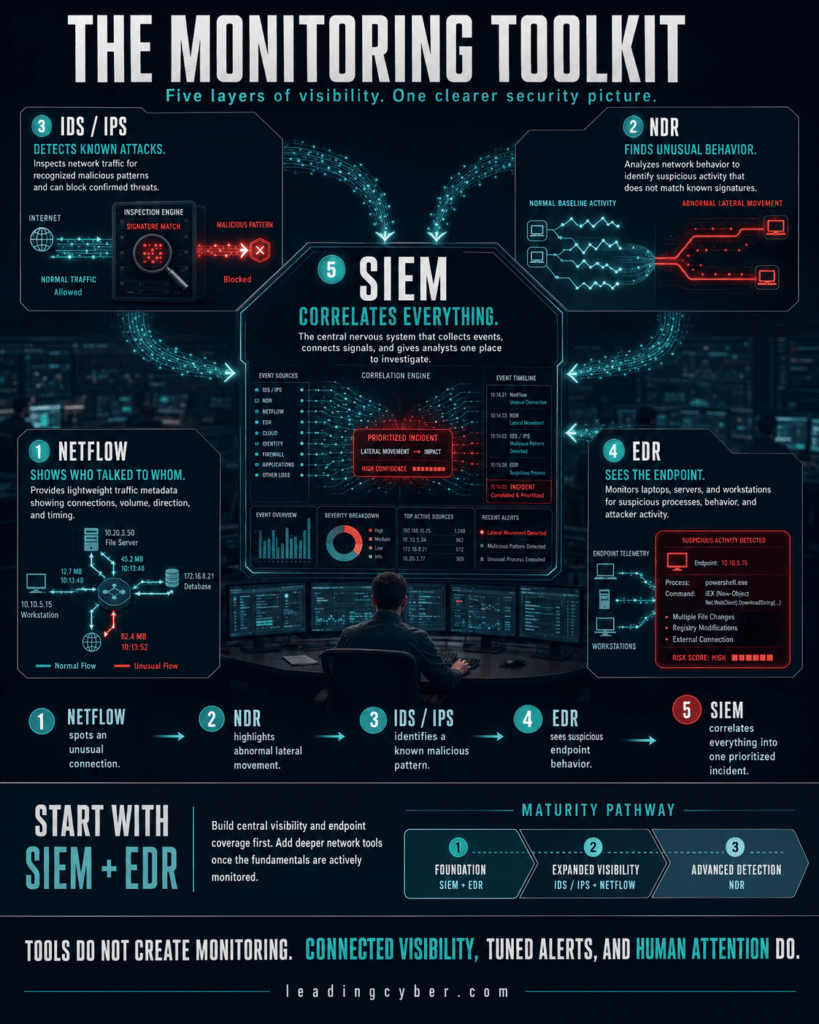
You don’t need every tool on this list to start; you need to know what each one is actually for:
- SIEM (Security Information and Event Management) — the central nervous system. Pulls logs from everywhere into one place and applies correlation rules to spot patterns a single log source never would.
- IDS/IPS (Intrusion Detection/Prevention Systems) — watches traffic for known attack signatures and, in the “prevention” flavor, can block it automatically.
- NDR (Network Detection and Response) — a newer category that leans on behavioral analysis rather than signatures, useful for catching attacks nobody’s written a signature for yet.
- NetFlow/sFlow analysis — traffic metadata (who, how much, how often) without capturing full packet content — lighter weight, and often enough to spot the anomaly that matters.
- EDR (Endpoint Detection and Response) — the endpoint half of the picture; without it, you’re monitoring the roads but not the houses.
For most mid-size organizations, a SIEM plus EDR covers the majority of real-world detection needs. NDR and full packet capture are worth adding once the basics are actually being watched — buying the advanced tool before anyone reads the basic logs is a common and expensive sequencing mistake.
Building a Monitoring Program That Doesn’t Drown You
- Start with your crown jewels. You can’t monitor everything equally on day one. Watch the systems that would actually hurt if compromised first — the same asset tiering that matters for risk-based vulnerability management applies here too.
- Establish a baseline before hunting for anomalies. You can’t spot “unusual” traffic if you don’t know what “usual” looks like. The first month of any monitoring program is mostly learning what normal is.
- Tune before you scale. A brand-new SIEM generates an overwhelming number of alerts, almost all of them noise. Spend real time tuning rules before adding more log sources — otherwise you’re just amplifying the noise.
- Write playbooks for your top alerts. When this fires, do this. Without a playbook, every alert becomes a fresh investigation from scratch, and analysts burn out fast.
- Staff for the hours attacks actually happen. Attackers favor nights, weekends, and holidays precisely because that’s when monitoring coverage thins out. A 9-to-5 SOC watching a 24/7 network has a predictable blind spot, and it’s the one attackers already know about.
The Alert Fatigue Problem
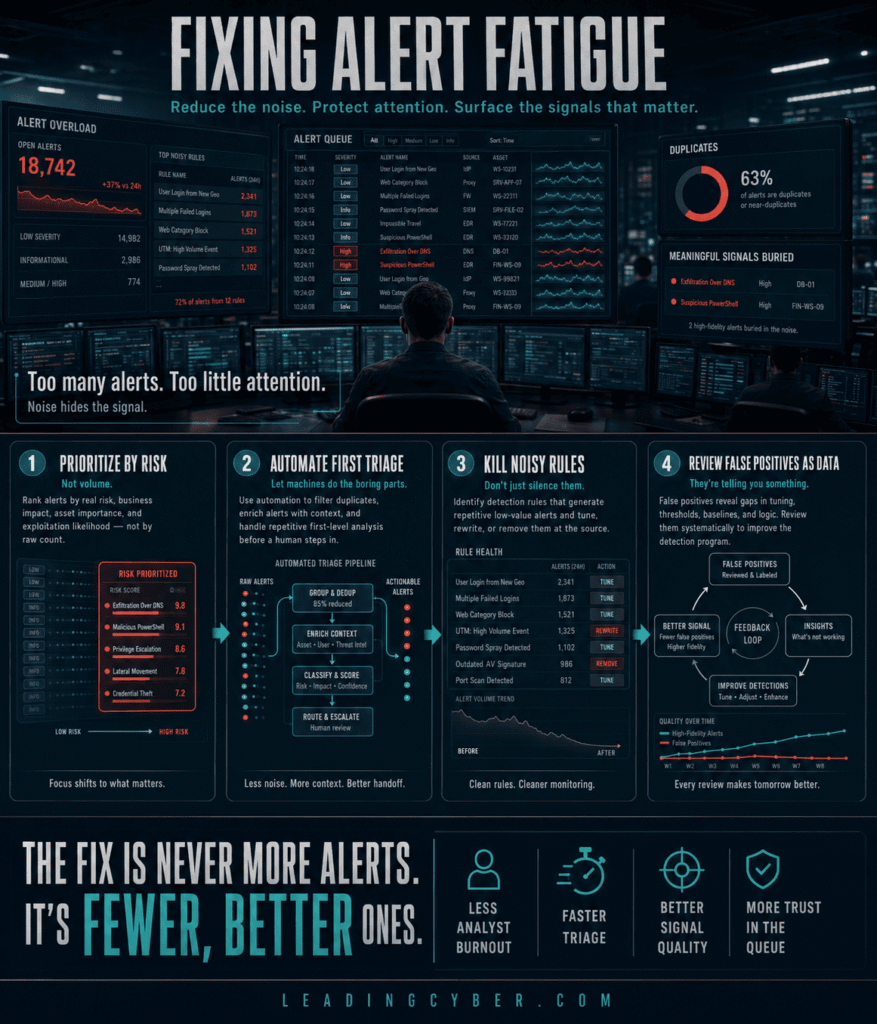
This is where most monitoring programs quietly die. Too many alerts, too many false positives, and analysts start doing the human thing: tuning out. The fix isn’t more alerts — it’s better ones.
- Prioritize by risk, not volume. The same logic from risk-based prioritization applies to alerts as much as vulnerabilities — a medium-confidence alert on a crown-jewel system deserves more attention than a high-confidence alert on a test box nobody cares about.
- Automate the boring first triage steps. Enrichment, initial context-gathering — let a machine do the parts that don’t need human judgment, and save the judgment for the parts that do.
- Kill noisy rules, don’t just silence them. A muted alert that nobody remembers muting is worse than no alert at all — it creates false confidence that something is being watched when it isn’t.
- Review false positives as data, not annoyances. A rule generating constant false positives is telling you something about your baseline that’s worth fixing.
Monitoring as Your Ransomware Early-Warning System
This is where monitoring earns its keep in the clearest, highest-stakes way. The tells that precede a ransomware detonation — security tools going silent, backup consoles being accessed, odd-hours privilege escalation — are exactly what a tuned monitoring program is built to catch. I covered the specific warning signs to watch for in detail elsewhere, but the underlying point here is broader: monitoring isn’t a compliance checkbox, it’s the difference between catching an attacker during their days-long dwell period and finding out only once the encryption finishes.
Metrics That Actually Matter
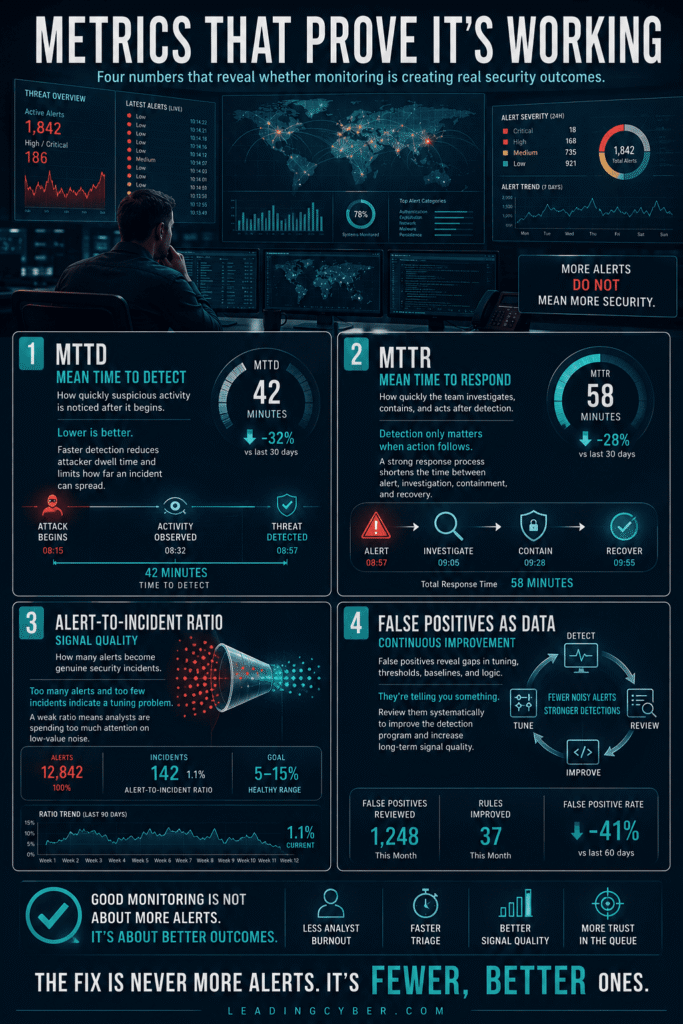
- Mean time to detect (MTTD) — how long between compromise and discovery. This is the number that most directly reflects whether monitoring is working.
- Mean time to respond (MTTR) — how long from alert to containment action.
- Alert-to-incident ratio — what fraction of alerts turn into real incidents; a very low ratio signals a tuning problem, not a security problem.
- Coverage — what percentage of critical assets are actually sending logs somewhere anyone’s watching. Gaps here quietly undermine every other metric on this list.
Key Takeaways
- Network security monitoring means continuous, active watching — logging without anyone reading it doesn’t count
- Cover traffic, perimeter logs, DNS, authentication, endpoints, and cloud/SaaS — skipping any layer leaves a blind spot
- A SIEM plus EDR covers most real-world needs; add NDR and full packet capture once the basics are actually being watched
- Alert fatigue kills more monitoring programs than any technical limitation — fix it with prioritization and tuning, not more alerts
- Monitoring is your best early-warning system against ransomware’s dwell period, and MTTD is the metric that proves it’s working
Frequently Asked Questions
What is network security monitoring?
Network security monitoring is the continuous collection and analysis of network traffic, logs, and events to detect compromise, misuse, or policy violations as they happen. It differs from simple logging in that someone or something is actively watching the data in close to real time, rather than the data just accumulating for a future investigation.
What tools are used for network security monitoring?
A SIEM (Security Information and Event Management) centralizes logs and applies correlation rules; IDS/IPS watches for known attack signatures; NDR (Network Detection and Response) uses behavioral analysis to catch novel attacks; NetFlow analysis tracks traffic metadata efficiently; and EDR covers endpoint activity. Most organizations get the majority of value from a SIEM and EDR before adding more advanced tools.
What should you monitor on a network?
Six layers matter: network traffic and flow data, perimeter and firewall logs, DNS queries, authentication and identity events, endpoint activity, and cloud/SaaS logs. Cloud monitoring is the fastest-growing blind spot, since many organizations watch their on-premises network closely while barely monitoring where an increasing share of their actual data lives.
What is alert fatigue in security monitoring?
Alert fatigue happens when a monitoring system generates so many alerts, many of them false positives, that analysts start tuning them out — increasing the risk that a real incident gets missed among the noise. It’s fixed by prioritizing alerts by actual risk rather than volume, automating routine triage steps, and eliminating or retuning consistently noisy rules rather than just muting them.
What is mean time to detect (MTTD)?
Mean time to detect is the average time between when a compromise actually occurs and when it’s discovered. It’s widely considered the single most direct measure of whether a monitoring program is working, since a shorter MTTD means attackers have less time to move laterally, steal data, or deploy ransomware before anyone notices.
How does network monitoring help detect ransomware?
Ransomware typically involves a dwell period of days or weeks before encryption begins, and that period leaves detectable signs: security tools being disabled, unusual access to backup systems, odd-hours privilege escalation, and abnormal authentication patterns. A tuned monitoring program is built to catch exactly these signals, turning what would be a catastrophic encryption event into a contained incident caught during preparation.