Every network security assessment I’ve ever run starts the same way: walking the inventory of network security devices and finding at least one nobody could fully explain. Not because the team was careless — because devices accumulate over years, get replaced piecemeal, and nobody ever sits down to map the whole picture at once. This guide is that map: what each device actually does, how they work together, and where most organizations get the layering wrong.
What Are Network Security Devices?
Network security devices are the hardware and virtual appliances that inspect, filter, and control traffic moving across a network — enforcing the rules that separate what’s allowed to happen from what isn’t. Individually, each device solves one specific problem. Together, layered correctly, they form the technical backbone of everything covered in network security management.
The Core Devices, One by One
Firewalls
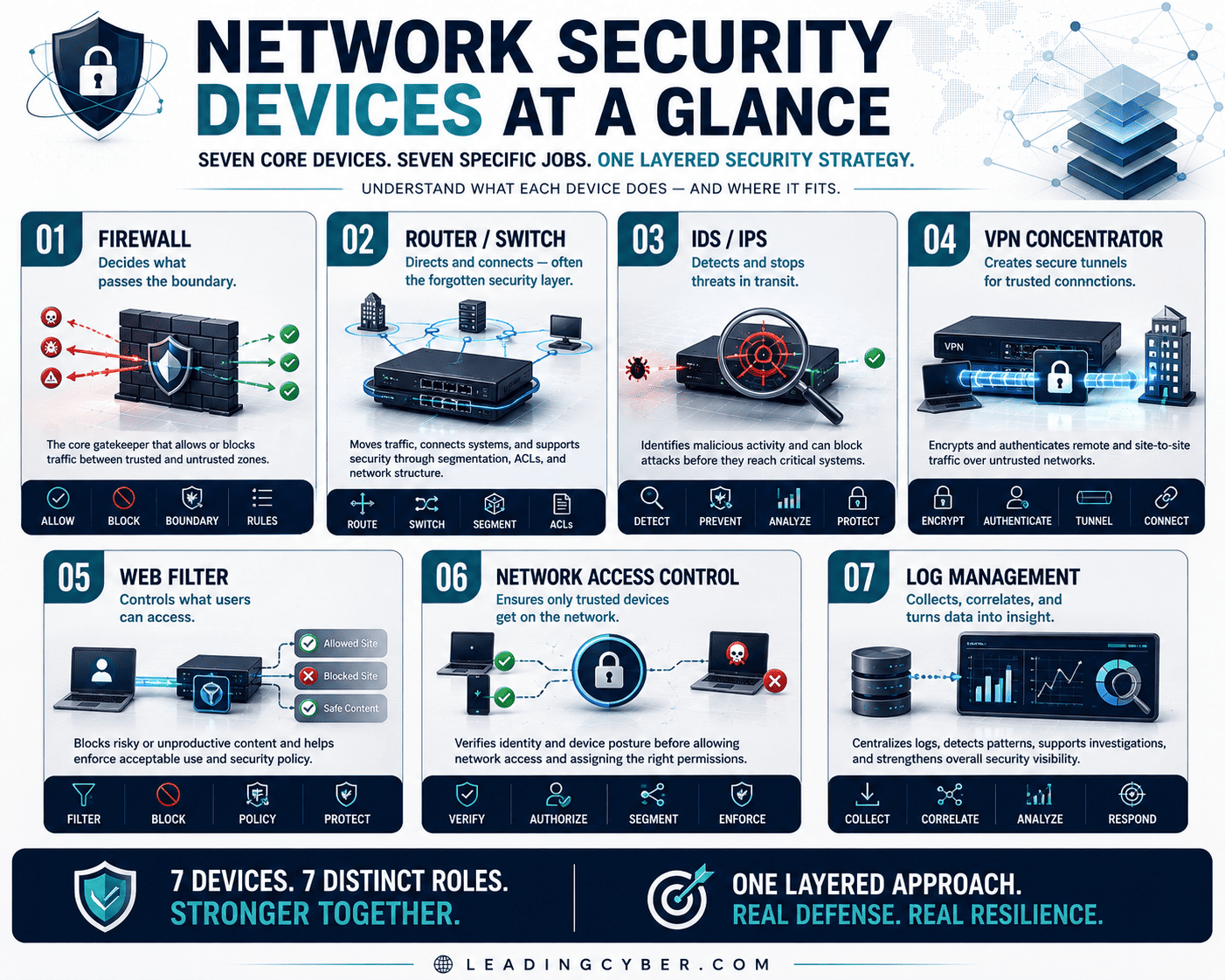
The gatekeeper. A firewall inspects traffic against rules and decides what passes and what gets blocked, typically at the boundary between trusted and untrusted zones. Modern “next-generation” firewalls add application awareness and intrusion prevention on top of the classic port-and-protocol filtering, but the core job hasn’t changed: decide what’s allowed through.
Routers and Switches
The plumbing, and often the least-appreciated security layer. Routers direct traffic between networks; switches connect devices within one. Both can enforce security through access control lists and VLAN segmentation — and both are, in my experience, the most likely devices to still be running factory-default credentials, precisely because nobody thinks of “networking gear” as “security gear” until an assessment says otherwise.
Intrusion Detection and Prevention Systems (IDS/IPS)
Watches traffic for known attack signatures. IDS alerts; IPS actively blocks. This is the device-level half of the monitoring toolkit — the hardware doing the watching that a SIEM later correlates and makes sense of.
VPN Concentrators
The remote-access gatekeeper, encrypting traffic between remote users or sites and the internal network. Every VPN concentrator is also, unavoidably, an internet-facing target — which is why patching this specific device category on a tighter cadence than internal-only gear is worth the extra attention.
Network Access Control (NAC) Systems
Decides what’s allowed to even join the network in the first place — checking device identity and health before granting access. NAC is what stops an unmanaged laptop or a rogue device from simply plugging into an open port and being on the network.
Wireless Access Points and Controllers
Security here means the protocol strength (WPA3 over WPA2 wherever supported), guest network isolation, and knowing every access point that exists — rogue APs, the ones someone plugged in “just for the conference room,” are a genuine and recurring finding.
Load Balancers and Web Application Firewalls (WAF)
Increasingly security-relevant as more of the business runs through web applications. A WAF specifically filters application-layer attacks — the kind a traditional firewall, built to inspect network-layer traffic, simply isn’t positioned to catch.
How These Devices Work Together: Defense in Depth
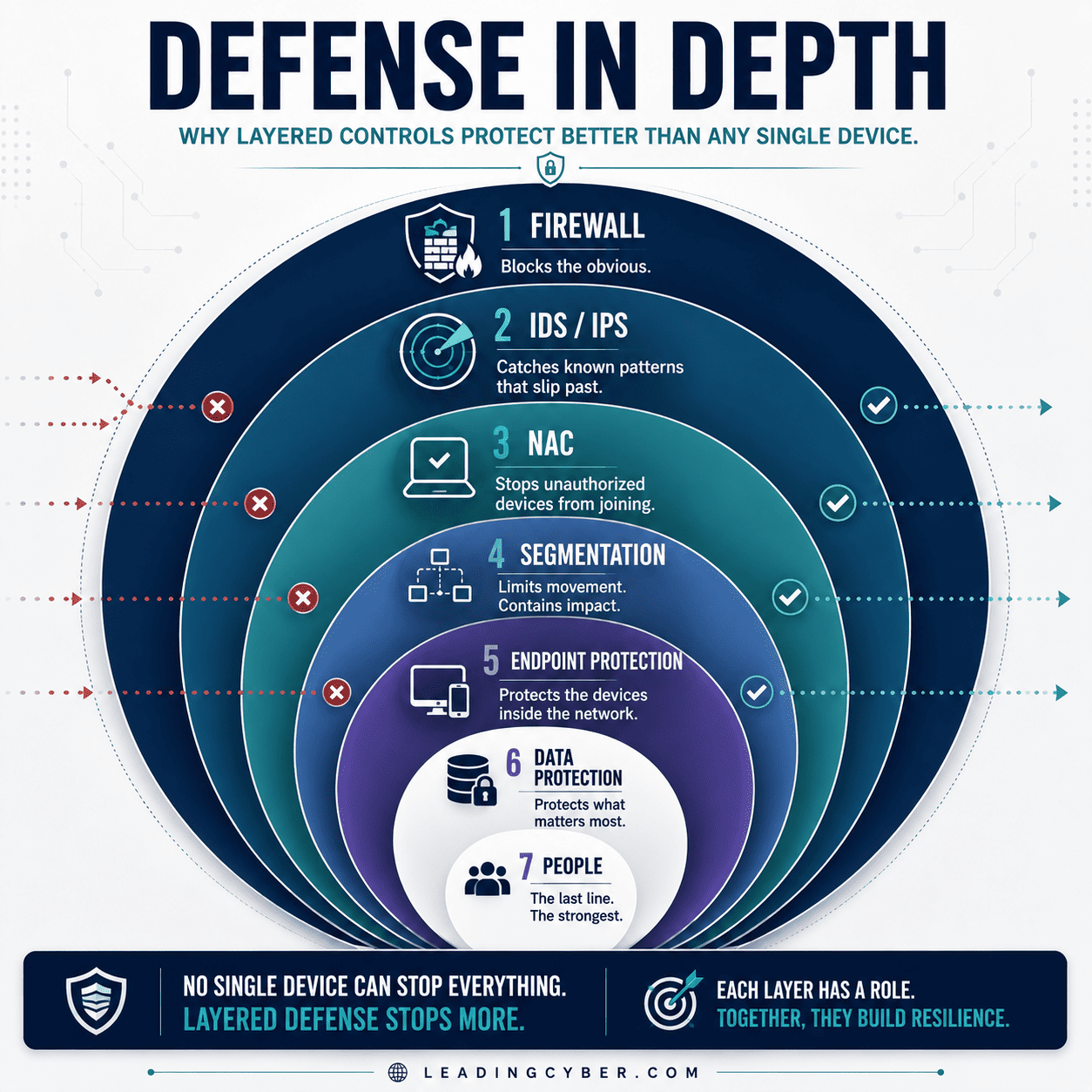
No single device is the security program. The concept holding them together is defense in depth — layering devices so that if one layer fails or gets bypassed, another catches what got through. A firewall blocks the obvious; an IDS/IPS catches known attack patterns that make it past the firewall; NAC stops unauthorized devices from ever joining; segmentation, enforced by routers and switches, contains whatever gets in from spreading further.
The failure pattern I see constantly is treating one device as if it’s the whole strategy — usually the firewall, because it’s the most visible one. A firewall with nothing behind it is a single point of failure with a good reputation.
Where Organizations Get Device Security Wrong
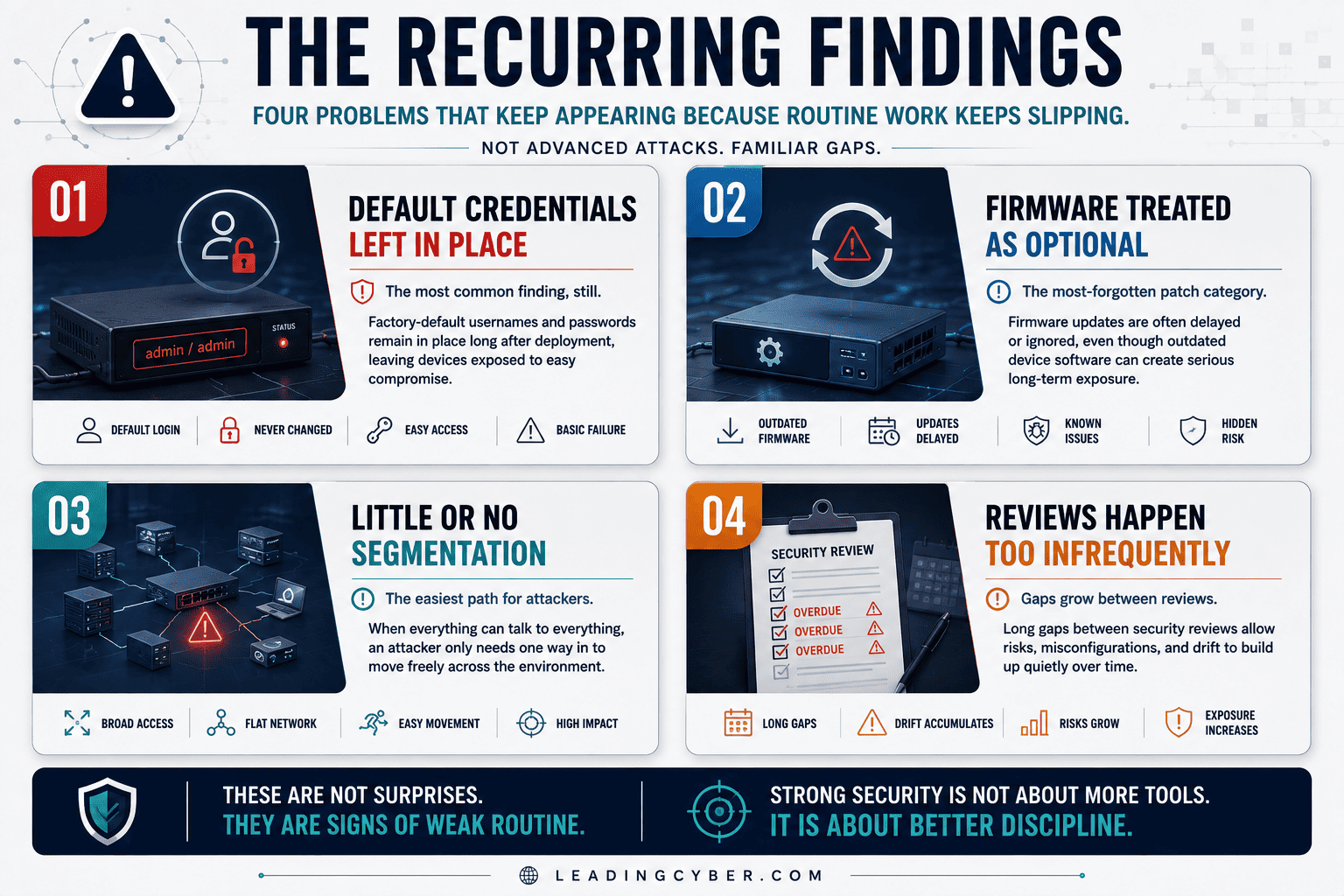
- Default credentials left in place. The single most common finding on switches, routers, and wireless controllers alike — genuinely surprising how often it’s still true.
- Firmware treated as optional. Network gear is the most commonly forgotten equipment in most patch programs, precisely because it “just works” and nobody wants to risk an outage touching it.
- Flat configuration across the fleet. Every device configured identically regardless of what it’s protecting, missing the chance to apply tighter rules where the stakes are actually higher.
- No retirement plan. Devices running years past their support lifecycle, no longer receiving security updates at all, quietly becoming the weakest link in a network that otherwise looks solid.
For Leaders: Devices Are Infrastructure, Not a One-Time Purchase
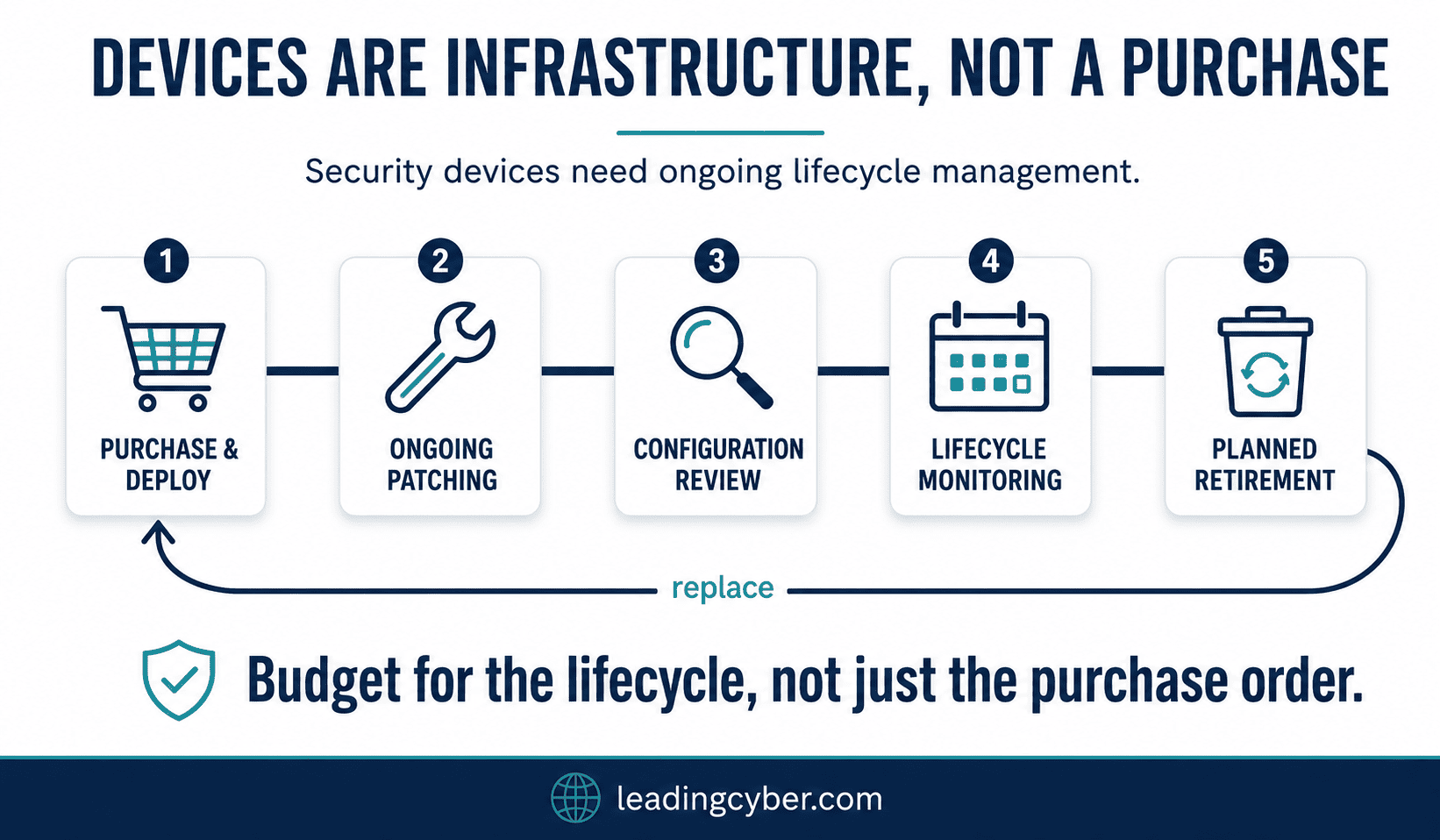
The mistake I see leadership make most often is treating network security devices as a capital purchase — buy the firewall, check the box, move on. Every device on this list needs ongoing patching, configuration review, and eventual replacement, which is exactly the ongoing discipline covered in network security management. Budget for the lifecycle, not just the purchase order, or the device that was excellent three years ago quietly becomes this year’s finding.
Key Takeaways
- Network security devices each solve one specific problem — firewalls gatekeep, IDS/IPS watches for known attacks, NAC controls who can join, VPN concentrators encrypt remote access
- Defense in depth is the concept that ties them together: no single device is the whole strategy
- Default credentials and unpatched firmware are the most common findings across every device category
- Network gear is infrastructure requiring ongoing lifecycle management, not a one-time purchase
- A WAF exists because traditional firewalls can’t see application-layer attacks — as more business runs through web apps, this gap matters more every year
Frequently Asked Questions
What are network security devices?
Network security devices are the hardware and virtual appliances that inspect, filter, and control network traffic — including firewalls, routers, switches, intrusion detection and prevention systems, VPN concentrators, network access control systems, wireless access points, and web application firewalls. Each device enforces a specific set of rules governing what traffic or activity is allowed.
What is the difference between a firewall and an IDS/IPS?
A firewall makes pass/block decisions based on rules like source, destination, and port, primarily at network boundaries. An IDS/IPS inspects traffic for known attack signatures and behavioral patterns, either alerting (IDS) or actively blocking (IPS) what it finds. Firewalls filter by rule; IDS/IPS detects by pattern — most networks need both working together.
What is defense in depth?
Defense in depth is the security principle of layering multiple different controls so that if one fails or gets bypassed, another catches the threat. In network security devices specifically, this means combining firewalls, IDS/IPS, network access control, and segmentation rather than relying on any single device as the entire security strategy.
What is a network access control (NAC) system?
A NAC system controls what devices are allowed to join a network in the first place, checking device identity and security posture before granting access. It’s what prevents an unmanaged laptop or unauthorized device from simply connecting to an open network port and gaining access without any verification.
Why is network device firmware often outdated?
Network gear tends to be the most overlooked equipment in patch management programs because it appears to “just work” and updating it carries a perceived risk of causing an outage. This makes firmware currency one of the most consistent findings in network security assessments, since devices can run for years without updates while everyone assumes someone else is handling it.
What is a web application firewall (WAF)?
A web application firewall filters traffic specifically at the application layer, protecting against attacks like SQL injection and cross-site scripting that traditional network-layer firewalls aren’t positioned to catch. As more business activity moves to web applications, a WAF fills a gap that a standard firewall alone leaves open.